Thursday, June 9, 2016


The amazing technology of Bluetooth presents a great
way of exchanging data between two wireless devices.
Unlike telephones, there are no wires or messy 
leads to worry about.  You can enjoy wireless 

communications with short distances of up to thirty
feet.

Bluetooth also offers interoperability, meaning that
you can use your portable Bluetooth device to connect
with existing Bluetooth points.  This way, you won't
have to carry a data lead or CDs of drivers around
with you everywhere you go.  You can enjoy the best
of wireless without having to worry about installing
your software.

With today's Bluetooth, you can use your PDA and cell
phone to surf the net or check emails as you travel.
If you are in the business field, this can be very
beneficial, especially if you like to check your
email throughout the day.  Bluetooth will enable you
to check your email no matter where you are - which
is great news for those who like to travel.

Bluetooth will also enable to you to transfer files
as well, such as MP3 and photo to and from your mobile
device.  Bluetooth dominates the world of short range
wireless, enabling you to do more than you may 
have thought possible.

One of the best things to Bluetooth and something
everyone loves is the wireless headset.  Bluetooth
offers wire free headsets for your cell phone or
computer, which is great for those who like to walk
around or talk on the phone in the car, without 
having to worry about your hands getting in the way.
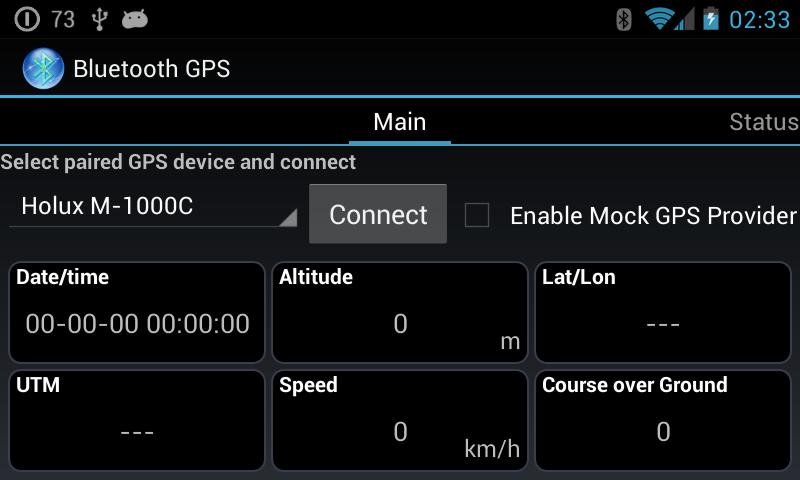
   
To make things even better, you can use a Bluetooth
GPS device for satellite navigation on your PDA,
laptop, or mobile.  If you travel - this can be 
really great to have.

Using Of Bluetooth

Bluetooth devices will normally operate at 2.4 GHZ
in the license free, globally available ISM radio
band.  The advantage to this band includes worldwide
availability and compatibility.  A disadvantage to
this however, is that the devices must share this
band with other RF emitters.  This includes
automobile security systems, other wireless devices,
and other noise sources, such as microwaves.

To overcome this challenge, Bluetooth employs a
fast frequency hopping scheme and therefore uses
shorter packets than other standards within the
ISM band.  This scheme helps to make Bluetooth
communication more robust and more secure.

Frequency hopping
Frequency hopping is basically jumping from frequency
to frequency within the ISM radio band.  After a
bluetooth device sends or receives a packet, it
and the device (or devices) it's communicating with
hop to another frequency before the next packet is
sent.  This scheme offers three advantages:
1.  Allows Bluetooth devices to use the
entirety of the available ISM band, while never
transmitting from a fixed frequency for more than a
short period of time.  This helps insure that
Bluetooth conforms to the ISM restrictions on the
transmission quantity per frequency.
2.  Ensures that any interference won't
last long.  Any packet that doesn't arrive safely
to its destination can be resent to the next
frequency.
3.  Provides a base level of security as
it's very hard for an eavesdropping device to predict
which frequency the Bluetooth devices will use
next.

The connected devices however, must agree upon the
frequency they will use next.  The specification
in Bluetooth ensures this in two ways.  First, it
defines a master and slave type relationship between
bluetooth devices.  Next, it specifies an algorithm
that uses device specific information when
calculating the frequency hop sequences.

How Bluetooth Works - YouTube

   Video untuk How Bluetooth Works▶ 3:45


A Bluetooth device that operates in master mode can
communicate with up to seven devices that are set in
slave mode.  To each of the slaves, the master
Bluetooth device will send its own unique address
and the value of its own internal clock.  The
information sent is then used to calculate the
frequency hop sequences.

Because the master device and each of the slave
devices use the same algorithm with the same initial
input, the connected devices will always arrive
together at the next frequency that they have agreed
upon.

As a replacement for cable technology, it's no
wonder that Bluetooth devices are usually battery
powered, such as wireless mice and battery powered
cell phones.  To conserve the power, most devices
operate in low power.  This helps to give Bluetooth
devices a range of around 5 - 10 meters.

This range is far enough for wireless communication
but close enough to avoid drawing too much power
from the power source of the device.

Working of Bluetooth

Constantly evolving, the technology of Bluetooth 
started off as a basic wireless connection standard
but has since then been adapted and proven with many
different uses and functions.

A good example is Bluetooth for cell phones.  It
enables mobile users to connect to their hands free
headset without using wires.  Bluetooth technology
will also allow mobile phone users to connect 
with their hands free kit as well.

Another handy use of Bluetooth is file sharing.  It
allows the sharing of files between two cell phones,
between a cell phone and computer, which makes the
sharing of files a snap.  If you have a cell phone
and computer, you can easily transfer data between
the two.

Say for example you wanted to put an MP3 on your
phone from your computer you could do it easily 
with Bluetooth.  All you would need is a Bluetooth
adapter for your computer.  It doesn't stop with the 
swapping of files either,as you can use your computer 
and phone to synchronise phone books, send SMS messages, 
and much more.

Although Bluetooth may be dandy for cell phones,
it also comes in handy for the home office as well.
Utilizing Bluetooth is a great way to set up a
home office - two computers, a printer, and even a
scanner.  They all can be connected using Bluetooth
technology with effective ranges of up to 10 meters.

The technology and devices of Bluetooth will be
around for years and years to come.  As years go
by, Bluetooth will provide even better wireless
solutions for different applications.  Even though
Bluetooth has a short range, it has that short
range for a reason.  Bluetooth is easily the best
in wireless technology - which it continues to 
prove time and time again.


With Bluetooth,We Connecting Moore,


Version 1.1 and earlier
Since the technology of Bluetooth was introduced in
1998, several specification versions have been
released.  Versions 1.0 and 1.0B had too many issues
and problems for manufacturers to develop devices 
for Bluetooth.  The main issue was the lack of
communication among the devices.

The core specification version 1.1 is the first 
successful operating version of Bluetooth.  Version
1.1 corrected a majority of the bugs and problems
found in earlier versions.

Version 1.2
Many of the newer Bluetooth devices, such as the 
newer cell phones are being sold with the newer
Bluetooth version 1.2.  This version offers backward
compatability with Bluetooth 1.1, faster transmission
speeds, received signal strength, and a host
controller interface (HCI) support for 3 wire UART.

Bluetooth version 2.0
It's true that there may be multiple communication
technologies, although they all share one common
trait - faster is better.  Bluetooth specialists
realized this, and therefore worked on improving
the speeds of version 1.2.  The newest version, 
version 2.0 + EDR (Enhanced Data Rate) was 
accounced in 2004 and became available in late
2005.

Version 2.0 delivers data transfer rates of up
to three times that of the original version of
Bluetooth.  Version 2.0 also provides enhanced
connectivity.  With Bluetooth 2.0 + EDR, you'll
be able to run more devices at the same time -
with more efficiency.

Computers and even computer related devices are
expected to be some of the first devices to 
encorporate Bluetooth 2.0 + EDR, followed of 
course by audio and imaging devices.  

Version 2.0 is backward compatible with previous
versions, three times faster, and offers an
enhanced data rate of 2.1 MB a second.  It also
offers broadcast and multicast support, along
with a further enhanced bit error rate
performance, making it the best Bluetooth has
ever seen.

BLUETOOTH V2.1

  • Backward compatible with v1.2.
  • Uses secure simple pairing (SSP) to improve a better pairing experience for Bluetooth devices.
  • Uses sniff sub rating, which reduces the power consumption in low-power mode.

BLUETOOTH V3.0

  • Backward compatible with v2.1.
  • Bluetooth 3.0 provides theoretical data transfer speeds of up to 24 Mbit / s.
  • For high data rate traffic this version uses the adjacent 802.11 link.

BLUETOOTH V4.0

  • Backward compatible with v3.0.
  • Provides faster speed in data transmission than the earlier version.
  • It comes with greatly reduced power consuming, as if it does not require any power at all to function.
  • It provides more security in data transmission than the earlier version.
Bluetooth technology is developing from day to day and one major feature of any version is just making the newer version superior over the earlier version. However more updated versions of Bluetooth technology will be keep on coming in future to meet all the requirements of the users

Versions of Bluetooth


Bluetooth is a specification for the use of low
power radio communications to wireless phones,
computers, and other network wireless devices over
short distances. 

 The name Bluetooth is actually
borrowed from Harald Bluetooth, a Denmark king
more than 1,000 years ago.

The technology of Bluetooth was primarily designed
to support simple wireless networking of devices
and peripherals, which includes cell phones, PDAs,
and wireless headsets.  The wireless signals that
are transmitted by Bluetooth cover short distances
of up to 30 feet, generally communicating less
than 1 MPps (Mega Byte per second).

The networks of Bluetooth feature dynamic topology
called PAN or a piconet.  The piconets contain a
minumum of two and a maximum of eight peer devices.
The devices will communicate using protocols that
are part of the specification.  

Even though the Bluetooth standard will utilize
the same 2.4 GHz range as 802.11b and 802.11g,
the technology isn't suitable for a Wi-Fi 
replacement.  When compared to Wi-Fi, Bluetooth
is much slower, limited in range, and actually
supports less devices.

For short range devices, Bluetooth is rapidly
becoming the best.  The technology is more popular
with cell phones, as Bluetooth headsets are the
way to go these days.  To use Bluetooth, your 
cell phone will need to have it enabled, or an
infared device somewhere on the phone.

Upcoming devices are utilizing Bluetooth as well,
such as PS3 and the Nintendo Revolution.  The 
wireless controllers will be Bluetooth enabled,
which will give players the cutting edge.

If you own a cell phone or other wireless device,
you should look into Bluetooth.  The technology
is nothing short of spectacular, making it 
something that will be around for years and
years to come.  As technology gets bigger and
bigger, you can expect Bluetooth to advance
as well.

Definition of Bluetooth

Tuesday, June 7, 2016

If you're familiar with  MS-DOS at all, you'll recall that it's a command-driven operating system that performs functions issued at the C:> prompt. The only way to get an MS-DOS computer to do something was to type a command at this prompt and if you can imagine, it was a rather cumbersome way to use a computer.

As an example, to load up Microsoft's simple editing program, you had to type the name of the drive that the program was on, the directory that the program was in, and then the name of the program. So if Microsoft Edit was in a directory or folder named "Process," you could start the program by typing, "C:>process\edit.com" Then, and only then would the program load up for use.

This is a small command, but just imagine if you had a program that was deeply nested within a series of folder. You could end up typing a command as wide as your computer screen or worse, long enough that the entire command would have to wrap onto the next line! Now imagine having to type these long commands every time that you wanted to start a program. Yikes!

That's one of the reasons why batch files became so popular. Batch files are small text-based documents that contain a bunch of these commands on their own lines. When executed, they would process each command without the user having to type each and every one of them.

When Windows was developed, the need for typing commands was essentially eradicated thanks to the introduction of the point-and-click (mouse) interface. But this didn't stop the batch file fever that started under MS-DOS - and in some small circles, batch files are still as popular as they were in the beginning.

Even though you may use Windows XP or Vista, batch files can save you tons of time by automatically starting multiple programs and performing different tasks at the single click of a button. They don't require any extensive programming background and they don't need to be encrypted with some weird, expensive compiler. Batch files are plain text files, and you can build one for your own personal use with Windows' Notepad.

You could make a batch file that loads up your favorite websites at once for example, or you could make a batch file that fills your desktop with the most important applications for the day. To do so only requires a little knowledge about the locations of these applications.

Let's say that every day we need to load up the Yahoo web browser, Microsoft Word, and then the calculator that comes with Windows. Instead of doing this by hand, we could write a batch file to do it for us.

First, we'd load up Notepad and type in the following:

START "http://www.yahoo.com"
START "c:/program files/microsoft office/office/winword.exe"
START "c:/windows/calc.exe"

We would then save this data into a file named, "mytasks.bat" onto the Desktop for easy access. Each time we double-clicked on this file, the Yahoo website would load up, Microsoft Word would start, and the simple calculator would pop up.

Since we want these programs to load every day, we could create a shortcut to this file and then place the shortcut inside our computer's Start Up folder. That way, these three programs would load every time we turn on the computer. If you wanted these programs to start minimized, you could type the following into a batch file instead:

START http://www.yahoo.com /m
START "c:/program files/microsoft office/office/winword.exe" /m
START "c:/windows/calc.exe" /m

This will run all three programs as before, however the "/m" parameter will minimize them so that they don't clutter up the desktop.

Other people have found much more creative and effective ways to use batch files, but the important thing is that you know they're a resource you can use to save a few seconds or minutes in performing important tasks. We've come a long way from MS-DOS, but it's still a valuable source of automation that anyone can use with no programming knowledge at all.


Automating with Batch Files at Computers

Getting help with your computer software can be easier when you know the correct terms to use. One of the biggest problems that new computer users have with technical support is not knowing how to correctly describe the problem that they're having. And it isn't fair to expect a tech support person to automatically know what a "thing-a-ma-jingy," or "whatcha-ma-call-it" is.

The following describes the correct names for common components of software so that when you experience a problem, you can effectively describe an issue that you're having and a technician can readily resolve it.

User interface - this is the visual design of a program. It may contain squares, boxes, words, icons, and buttons. If you're experiencing insufficient memory for example, you might see black rectangles across the user interface of your software programs.

Title bar - this is the top-most part of a program that displays its own name or it may describe the contents displayed in another part of the interface. If a program is incorrectly coded, you may see a wrong description in this part of its interface.

Menu bar - this part of a program displays menu items and menu options. Some of the most common parts of a menu bar grants access to File commands, Open commands, Save commands, and Print commands. An example of an error in this part of an interface would be if an option was missing or grayed out (lighter in color).

Tool bar - this part of a program displays small icons across the top which represent tools. Clicking an icon will open a tool or process a command that might also exist on a program's menu bar. Problems in this part of an interface are uncommon, however if you find yourself repeatedly clicking an icon with no results, you can correctly describe the problem by referring to the toolbar.

Minimize, Restore, and Exit buttons - these three buttons are usually located on the right-most upper part of a program's interface and each allow you to minimize a program's screen, restore it to its original size, or shut down the program completely.

Scroll bar - this convenient tool allows users to move data up and down the computer screen.

Status bar - this part of a program is located at the bottom-most part of its interface, and it usually displays small messages that indicate the progress of a command or task. If programmed incorrectly, an application might display the wrong information in this area.

Context menu - like the menu bar, a context menu displays when a user right-clicks on something. It displays commands just like what you see on a File menu or a Help menu.

Input box - input boxes are usually small rectangles that allow you to type data into a simple interfaces like a webpage or browser window. If you find that you can't type information into one of these, you can effectively resolve the issue with a technician by calling it an input box, rather than a "white rectangle," or "place to put in text."

Button - buttons perform a command after a user clicks them with a mouse. Problems occur when the text of a button is grayed out or if it doesn't appear to sink into the screen when clicked.

Check box - a check box is a small box that allows a user to indicate several choices among many. When clicked, a small "x" displays inside a box. Similar to the check box, a radio button allows a user to indicate a single choice among many. Problems with radio buttons and check boxes occur when a user makes one choice, but the interface reacts as if the user made many choices (or none at all). When describing a problem to a technician, be sure to indicate whether the problem occurs with a check box or a radio box. Computer novices mistakenly interchange the names of both of these controls.


Basic GUI Terminology of Computer


If you haven't heard of smartphones, we'd like to learn where you've been hiding all this time. Smartphones have been all over the news and chances are, you do know what they are - only you know them under a different name. Smartphones are mobile phones with computer like capabilities.

What's that? Aha! Yes, you've not only heard of them, you've probably seen them as well.  Packed with Internet access, email capabilities, address books, and a whole lot more, cell phones have come a long way since their first debut. But be careful not to confuse these newest toys with sandbox devices.

Sandbox devices are tools that come pre-loaded with things like calendars, calculators, and a notepad. What differentiates them from smartphones is that users can add (download and install) additional programs to smartphones and they seemingly become mini portable computers for the people who use them. That - and the ability to edit the content that sits on them - is what makes these phones "smart."

Some of the more popular brand names include the Blackberry, PalmSource, Nokia, and Windows CE. Yet the craze is extending to even some off-brand company names. Today, it's hard to find a cell phone that doesn't offer some sort of "smart" technology because it's in such a high demand. The convenience of having information at our immediate access is phenomenal - so much so that thousands of programmers have jumped on the opportunity to build unique applications specific to these small machines.

As a result, you can find tons of games, databases, GPA systems, weather reporting programs, and even small encyclopedias on these things - each accessible not at the click of a mouse - but at a few presses of a free thumb. Of course a mini keyboard is available for the text-messaging fan or for the poor fellow who can't seem to get away from the office. In the latter case, don't be surprised if you find the entire Microsoft Office suite displayed within a screen no bigger than a matchbook.

Is this a phase? That's highly doubtful. The market for these devices extends from the highly technical and professional all the way to the pre-teen socialite. The product crosses all demographics and thanks to decreasing costs - it sees no economic boundaries as well. The Wikipedia encyclopedia claims that "Out of 1 billion camera phones to be shipped in 2008, Smartphones, the higher end of the market with full email support, will represent about 10% of the market or about 100 million units."

But what is it that makes smartphones so appealing? As mentioned, smartphones give us the ability to not only carry our data around with us where ever we go, it also gives us the ability to edit that data any place - any time. In today's "reality" based generation, we're always looking for the opportunity to capture and relive a moment. And we want to share that moment with others. At best, smart phones give us the opportunity to express ourselves impromptu with entertaining results.

Attempting to do the same with a bulky desktop computer or laptop is to cumbersome. Even some of the smallest peripherals (digicams, digital cameras, etc.) don't give us the same opportunities that smart phones do. Being able to carry around a device for communication, creation, recording, and editing simply compliments the need for today's generation to do more and then do it, faster!


Smartphones, What's the craze all about?

Friday, June 3, 2016

Explore the most popular and best selling products from online store
Below we collect the most sold items from the week. Find your lingerie favourites today by visting AMAZON


Best Seller Items In The Online Store

Sunday, May 29, 2016


Yesterday, we spent about three hours trying to convince a client of ours that brand new computers just don't come equipped with the all things that most computers need in a PC. We tried to convince him that a fully functional computer is one that is personalized with specially selected hardware and software accessories - and that the computer purchased at the store doesn't come with these things. Unfortunately, all of our convincing was to our avail. Our client insisted that he should never need more than what came with his boxed product and that we were just trying "bilk" more money out of him.

As computer consultants, it's our job and mission to make sure our clients are 100% satisfied when they walk out our offices. But our job is unnecessarily made harder when people don't take the time to learn about computer accessories and familiarize themselves with the limitations of store-bought computers. Hopefully by the time you finish reading this article, you'll understand the lesson that we were trying to teach our client: "What comes out of the box is really just a starter kit."

The typical computer package comes with a CPU unit, keyboard, mouse, and speaker set. That may be just fine for some, but most people require more than that especially in today's "connected" society. Today's users require full multimedia capabilities, a wide range of graphics tools, and accommodations for the various portables we now enjoy. These extras aren't included with "what comes out of the box," and the only way to get them is to accessorize.

To illustrate the importance of accessorizing, we like to use the "plain dough" analogy. Let's say that a brand new computer is a batch of plain dough - waiting to be flavored and baked into something useful. If we want to use this dough to make a delicious batch of chocolate chip cookies, we would need to "accessorize" this dough with chocolate chips and a little brown sugar. If we want to use this dough into in a warm loaf of sesame seed bread on the other hand, we'd need to "accessorize" the dough with yeast and sesame seeds.

Like "plain dough," the brand new computer isn't very useful by itself. It needs accessorizing.

Depending on what's needed, accessorizing doesn't need to be expensive.  In fact, you can get away with paying a minimal amount for extra software and hardware if these accessories are for children. It's when these accessories are work requirements or when they're needed to produce works of quality for any other reason that they can become rather expensive. And this expense applies to microphones, digital cameras, PDAs, scanners, video cams, and more.

Regardless of cost, it's important to understand that accessories can become "necessities," and that the best time to get them is the moment you buy a new computer. Waiting too long to accessorize can cause more problems than necessary because while you wait, manufacturers continuously develop new technologies - technologies that your computer won't be able to accommodate in the future. Once you're ready to accessorize, the new products on the market are too advanced for your computer and they just won't work. This is a typical problem experienced by those who want to use hardware designed for Windows Vista on a Windows XP or Windows 2000 machine.


Make Accessorizing Computer


Creating a good wireless headset for Bluetooth is
actually difficult to do.  The regular wired headsets
are easy to design - with ranging styles.

Bluetooth headsets can never be as small or as light
as wired headsets, simply because it needs to include
the battery and extra functions. This extra size
will impact how the headset mounts on or around
your ears.

Comfort
There seems to be two main styles of headsets for
Bluetooth.  Some are held into place with a loop
around the ear.  These styles are normally more
comfortable, although they may be less secure.  The
others are held in place by being jammed into
your ear - and usually prove to be less comfortable.

Factors to consider

Cost
The cost is an obvious issue, something that you
really need to think about.

Ergonomics
1.  Check to see if the device is easy to
quickly and conveniently put on your ear then take
it off again.
2.  Are the control buttons on the headset
easy to use?
3.  The headset should be comfortable to
wear for long phone calls.
4.  Can you use it with a pair of glasses?
5.  Check to see if you can wear it with
either ear.
6.  When you aren't wearing it, you'll
need to se how you would carry it with you.
7.  The weight is important as well, as you
don't want something that has the risk of falling
off.

Easy of use.
1.  The commands and controls should be
easy to remember.
2.  The volume level should be easy to
adjust.
3.  The unit should turn on quickly.
4.  The manual should be very well written
and easy for you to understand.
5.  There should be a support number for
you to call if you should experience any types of
problems.

Features
1.  You'll need to know about the battery,
the talk time, type, and how to tell when it is
going dead or fully charged.
2.  How many devices can the unit be paired
with?
3.  Compatability is also important, as
well as the warranty period.
4.  Check the sound quality for both
sending and receiving audio.
5.  What type of range does the headset offer
you?

Other important capabilities include voice tags,
last number redial, tranfer calls, 3 way calling,
link to other phones, call reject, and mute.  You'll
also want to note if it looks attractive, and if
it's too big or too small.
:cute: :lol: :smile: :laugh:


Bluetooth Headset And How to Choose It


To sustain the profitable state of your business in this fastpaced cellular phone industry, creating useful and functional cellular phone may be necessary. Various accessories for your cellular phone may also add to your chances of being ahead of the competition. The competition does not stop from designing functional cellular phones and accessories, they also create the need for ring tones and wallpapers. Cellular phone ring tones and cellular phone wallpapers add to the growing number of dress up paraphernalia for your cellular phone. Ring tones and wallpapers give personality to your cellular phone, thus you can flaunt his high-tech gadget to the world.

Because of the entertaining effect and beauty of cellular phone ring tones and cellular phone wallpapers, computer experts and cellular phone manufacturers are quick to design software and gadgets that will help in the easy installation of ring tones and wallpapers. This gave birth to a ring tone converter. The cellular phone ring tone converter will help to transfer ring tones from one cellular phone to another. This ring tone converters also help in downloading ring tones from computers and internet sites. These are also cellular phones, which supports manual input of cellular phone ring tones. Ring tones transfer via SMS is also possible. A cellular phone ring tone converter may also function when transferring a ring tone from other cellular phone brands. Although there are cellular phone models that does not support ring tone converters, it is however possible that the cellular phone has a built in cellular phone ring tone which will help create a dignified personality for your cellular phone.

Availability of ring tone converters, which does not require cables and infrared connections, proves to be easy to use if you need to download cellular phone ring tones. If you are serious in personalizing your cellular phone ring tone, you may try to find a cellular phone with fully functional ring tone composer. Then you may now create and edit cellular phone ring tones when you have this composer in your cellular phone. Editing ring tones and converting your favorite song into a cellular phone ring tone is easy with the modern ring tone converter. The ring tone composer of your cellular phone may also do this job as well as your converter.

Additionally there are available websites where you can acquire cellular phone ring tones. There are those websites that use SMS format from where you can download ring tones using a converter, but there are those that merely require the downloading capacity of your phone and nothing more. You will now have a cellular phone ring tones that may provide the personality you want.

Knowing that there are cellular phone ring tone converter and built-in composers, it may further enhance your cellular phone ring tone if you know the software that is best used with your converter. This information will now help you create that personality you want for your high-tech gadget.

Having all these information, you may go to various internet sites and look for the best monophonic or polyphonic ring tone, which you may feel is a suited ring tone for your cellular phone. Having a cellular phone ring tone and cellular phone wallpaper is good; however, you may first check your phone before you even think of ring tones, because editing and downloading ring tones may require a support from your own cellular phone model. Do not despair however if your phone do not support editing and downloading cellular phone ring tones because manufacturers have built-in ring tones, although it may not be the music you want but just the same you have the ring tone.


.

tthank you for rread this article,and this below I give you some of classic ringtone for any cellphone:

nokia6210_02_ring_ring.mp3


old_american_phone.mp3


Classic Ringtone,Entertain yourself with cellular phone ring tones

Friday, May 27, 2016


Cellular phones have become one of the most functional modern day gadgets. It has evolved from being a luxurious toy for young professional into a necessity for the multi dimensional life of these young professionals. However, cellular phones have different use for different people. Now, minors sport a cellular phone as a functional display, they consider it part of their wardrobe and flaunt having this modern day gadget in there complete get up. However, this is not the function of cellular phone to the business world. They are necessities and not for dressing up. Because of the varied usefulness of cellular phones and the increasing need and want for easy communication, manufacturers are quick to take advantage of this booming industry. Cellular phones and cellular phone accessories now flood the marketplace with different designs and different functionalities. Various cellular phone models and accessories including Audiovox cellular phone accessory comes in beautiful and functional designs.

Audiovox cellular phones and Audiovox cellular phone accessory can be such functional and comes with models that are lightweight and of beautiful designs. Audiovox cellular phone accessory such as premium power cord is a versatile power cord comes with cellular phone conditioning capacity. Audiovox cellular phone accessory also include a hip clip holder that can be functional even when your cellular phone is not Audiovox. In addition, Audiovox cellular phone accessory such as headsets and ear glove produce a hands-free cellular phone function that will help you keep your hands on the wheels. This will avoid accidents due to one hand driving and decreased attention on the road. Additionally, the over ear portable hands-free kit from the wide array of Audiovox cellular phone accessory line also functions to provide hands free telephony and had a built in feature that reduces background noise. You will hear clearly the person on the other line, even while driving or doing other stuff. There is also that Jabra model of Audiovox cellular phone accessory, which is a headset that provides hands-free telephoning. Jabra is small, lighter that other headsets and stylish; it also functions as a speakerphone and thus is a more functional gadget for your cellular phone.

All these prove that Audivox cellular phone and Audiovox cellular phone accessory line are functional and technologically advance. Audiovox cellular phone accessory is a multi-functional accessory, it can function well with Audiovox cellular phone but it can also perform its functionality with other cellular phone brands.

There is also that Audiovox cellular phone accessory like the multi-functional antennae, this is attached to your car while you travel, and it functions well when you talk to another person on the other line while the car is in motion. There are other antennas that limits their functions when you are mobile, not the antennae from the Audiovox cellular phone accessory line. This Audiovox cellular phone accessory design of antennae is very useful for travelers and corporate executives. If you are looking for functionality in your cellular phone, try to find an Audiovox cellular phone and the matching Audiovox cellular earphone accessory for your communication requirements. They are very good for young professional who endeavor doing many things are the same time. Your Audiovox cellular phone and Audiovox cellular phone accessory line can compliment your highly active lifestyle.

Cellular Phone Accessory (AUDIOVOX), For The Most Functional Accessory

Wednesday, May 25, 2016

Share Up To 110 % - 10% Affiliate Program

The old concept that cellular phones are merely luxurious toys is now dismissed by the growing need for it. Cellular phones now became a very essential tool for everyone including parents who want to know where their kids are on a real time basis. Business executives do business more effectively with a multi-functional cellular phone. Eve teenagers need cellular phones. Gone are the days when cellular phones are toys to show off, now cellular phones evolve to be a necessity. Thus, cellular phones of various models and designs now flood the market. There are those cellular phones that can perform many different functions but there are also those basic telephones that come in cheap.


Because of this great need and want for cellular phones, manufacturers flood the market from cheap cellular phones to high-tech cellular phones.  If you are one of those who are lucky and that you can afford high-tech cellular phones, then that is good for you, however, if you want or need a cellular phone but cannot afford high-tech cellular phones, then you may acquire a cheap cellular phone.

Knowing what you need and how you need it may help you find a cellular phone with reasonable and useful features. If you are to buy a cheap cellular phone, you should never expect it to perform tasks a high tech cellular phone can give. Merely being able to send and receive calls may be enough for you to expect from your cheap cellular phone. Because you cannot afford the high definition performance of high tech cellular phone, having reasonable expectation may help you avoid throwing your cellular phone out of your window. Cellular phones especially cheap cellular phones may only give you basic communication capabilities. Having to send and receive call which is the basic function of a cellular phone may be the only functions if can offer. Thus, you need to check the reception of your cheap cellular phone, since this is the only thing it is good for, it has to perform well enough for this basic function. Sending and receiving text messages may be available for cheap cellular phone however, only on a limited basis. If your can find a cheap cellular phone that has text messaging capacity, it will be better for you. Sending and receiving internet communication may not be available for cheap cellular phone; you do not need it as much anyway. However, if you do need to be able to send and receive message in your cellular phone from internet sites, cheap cellular phone is not going to be any good.


Cheap cellular phones notwithstanding, if you can afford cellular phone plan that provide free cellular phones, you may choose a cellular phone plan that will provide free cellular phone with reasonable and advanced features. Not the high-tech cellular phone but definitely not very limited features like what you will find in cheap cellular phones. Various network companies offer this wonderful promotion and thus you may take advantage of owning a good quality cellular phone. If you can find a neat deal from a cellular phone plan, you may not need to content yourself with cheap cellular phones.

Even a simple as buying a cellular phone, one need to research a bit in order to get enough and reasonable benefit even form a meager budget, thus you may not need to settle for a cheap cellular phone.

Cheap cellular phone, only an alternative

Monday, May 23, 2016

Share Up To 110 % - 10% Affiliate Program Modern devices and gadgets are already part of our homes these days. While most gadgets are created to prove home security, there are several companies that are dedicated in coming up with other inventions that provide comfort and convenience as well. As each day advances, technology moves forward too. These inventions make you have a smarter home.


Today, there are a handful of modern devices and gadgets that are available for every home needs. One of which is the so-called smarter thermostat. Thermostats play a big role in the heating of homes especially during the winter time. Homes without a thermostat would most likely make-do with a home furnace or a chimney to be able to protect themselves from the numbing cold winter offers. A thermostat that can automatically turn on and turn off itself according to the changes in temperature would be a big help in keeping the energy costs at home in check.


Another home gadget that people must have these days is the solar blinds that can be controlled remotely too. These blinds do not only save energy, which is the main function, but also set the mode while you are at home relaxing from a long day at work.

Electric fireplaces are another appealing modern gadget that people would like to have. Why? This is not just an ordinary fireplace. This technology can add a magical touch to your home because it doesn't only switch on, but it also transform from opaque ceramic column to a transparent one. Not only will your home looks stylish, it will be more efficient and perfect for your needs as well.

If you can't have all the modern devices and gadgets available in the market, then perhaps having one to consider will not hurt. Wi-Fi doorbells with motion sensors is another gadget you should consider getting for your homes.. One of its amazing features is that you can actually see who is at your door even if you are not at home. No matter where you are, you can also speak to the person who is at your doorstep. This cool idea and gadget increases the security inside your homes, even if you are not there.


These are just some of the modern devices and gadgets that are available already in the market. Some consider these home devices as lavishness, but there are gadgets that are actually necessary to ensure not only comfort but also security in your own home. Most of these gadgets and technological advances were developed to provide your homes with better and more efficient options for your homes and your lives.
How Is Your Modern Devices and Gadgets for Your Homes ?

 
CELLPHONE AND COMPUTER GALLERY © 2015 - Blogger Templates Designed by Templateism.com